Real Estate CRM Automation: The Workflows Every Team Should Build
Part of our complete guide to real estate CRM software.
A CRM only earns its keep when it’s working leads while you’re not. That’s what automation does: it turns your CRM from a database you have to remember to use into an engine that follows up on its own — instantly, consistently, and at a scale no human could match by hand. The catch is that automation is only as good as the workflows you build into it. Here are the ones every real estate team should have running.
Quick answer: Real estate CRM automation uses triggers and pre-built sequences to handle follow-up automatically — texts, emails, and tasks that fire based on time or behavior. The core workflows every team should build are: an instant lead response, a new-lead nurture sequence, behavioral triggers, a long-term nurture track, a re-engagement campaign, and a past-client/sphere cadence. Start with two or three and expand.
First, drip vs. behavioral automation
Before the workflows, one distinction that determines how good your automation is. Drip automation sends everyone the same sequence on a fixed schedule — day one, day three, day seven, and so on. It’s better than nothing, but it ignores what the lead is actually doing. Behavioral automation reacts to real signals: a lead returns to your site, saves a search, or revisits a listing, and the system responds to that.
The strongest setups combine both: a baseline nurture cadence for everyone, overridden by behavioral triggers when a lead heats up. As you build the workflows below, lean toward behavioral wherever your CRM and website data allow it — relevance is what makes automation feel helpful instead of canned. (Behavioral triggers depend on the website-CRM connection covered in our complete guide to real estate CRM.)
The workflows every team should build
1. The instant lead-response workflow
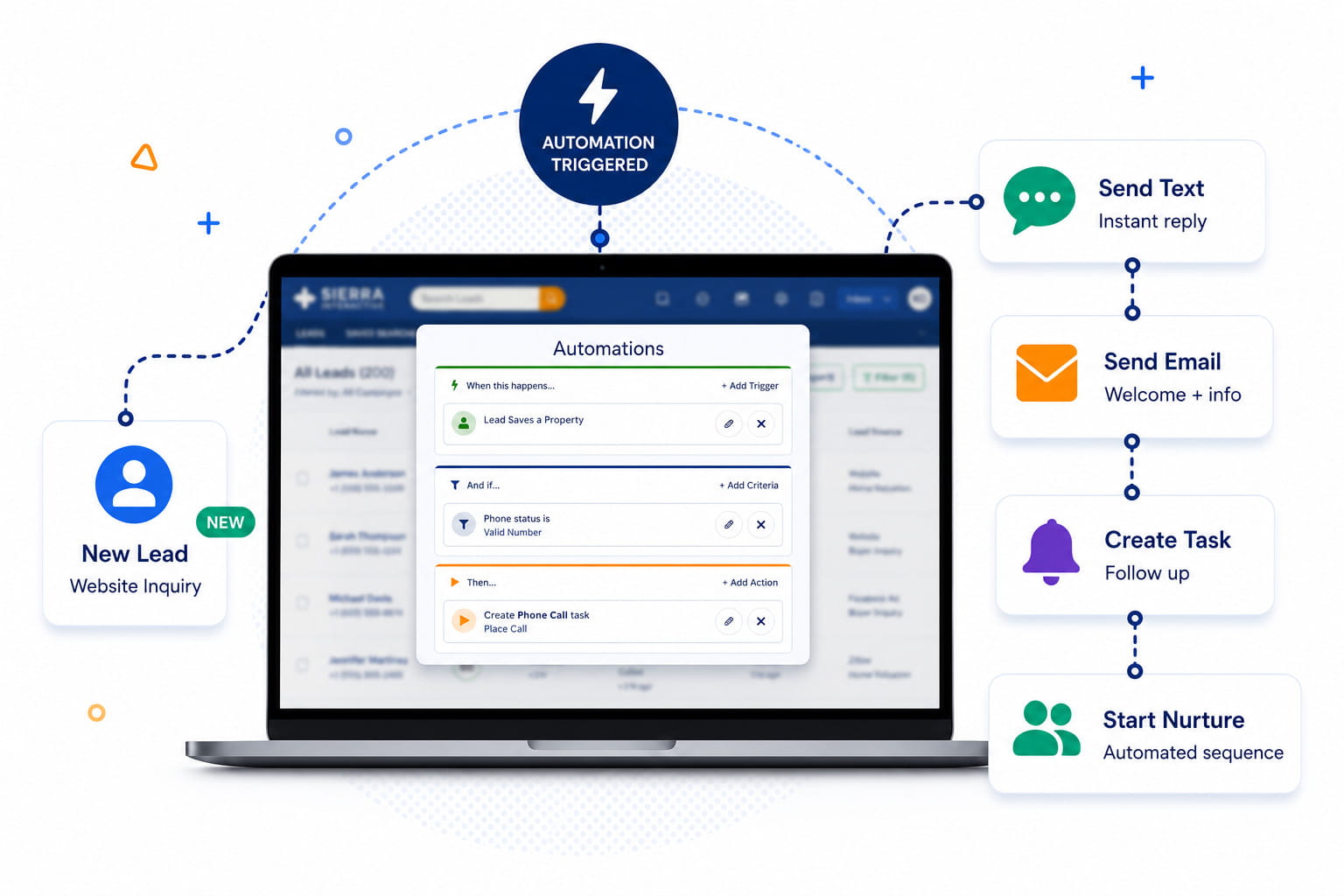
The non-negotiable starting point. The moment a lead registers, an automated text and email goes out acknowledging them and opening a conversation — even at 11 PM. This captures the critical window when you physically can’t respond, and it’s the single highest-impact automation you’ll build. Because it matters so much, we cover the why and the data in depth in speed to lead — but if you build only one workflow, build this one.
2. The new-lead nurture sequence
After the instant response, new leads who don’t immediately engage should drop into a multi-touch nurture sequence — a mix of helpful texts and emails spaced over the following days and weeks. The goal isn’t to hard-sell; it’s to stay present and useful while the lead decides whether they’re ready. Build it multi-channel (text tends to outperform email for early touches) and keep each message short and easy to reply to.
3. Behavioral triggers
This is where automation gets smart. Set triggers that fire on real activity: a lead returns after going quiet, saves a new search, revisits a specific listing, or a price drops on a home they viewed. Each of these is a buying signal, and a timely, relevant message in that moment converts far better than anything on a fixed calendar. Behavioral triggers depend on your CRM seeing website activity, which is why the website-CRM connection matters so much.
4. The long-term nurture track
Most leads aren’t ready for six to eighteen months, and they need a different cadence than a hot lead — lighter, less frequent, genuinely useful. A long-term nurture track keeps you in front of these slow-burn leads with periodic market updates and relevant listings, so you’re the agent they remember when the timing finally turns. This is the workflow that rescues all the leads other agents give up on after two weeks.
5. The re-engagement (win-back) campaign
Leads go cold. A re-engagement workflow automatically reaches out to contacts who’ve gone silent for a defined period — a fresh listing, a market update, a simple check-in — to revive the ones who are still in the market but drifted. It costs nothing to run automatically and routinely surfaces deals you’d otherwise have written off.
6. The past-client and sphere cadence
Your most profitable leads come from people who already know you — but only if you stay in touch. Automate a steady cadence to past clients and your sphere: home anniversaries, periodic market updates on their neighborhood, and seasonal touches. Set it once and it runs for years, quietly producing the repeat and referral business that’s cheaper and higher-converting than any lead source you pay for.
7. Seller and valuation follow-up
Seller leads behave differently from buyers, so they deserve their own workflow. A home-valuation request should trigger an immediate response plus a follow-up sequence tailored to a potential seller — equity updates, local market activity, and reasons to have a conversation now. Separating seller automation from buyer automation keeps the messaging relevant.
8. Agent tasks and reminders
Not all automation is messaging. Automate the internal workflow too: assign follow-up tasks to the right agent, create reminders so no contact slips, and route leads automatically so nothing sits unclaimed. This is the layer that keeps your team accountable without a manager chasing everyone. (Most of these are configured during CRM setup.)
The golden rule: pause on reply
One rule governs all of the above: automation must stop the instant a real conversation starts. Nothing damages trust faster than a lead replying to a message and then receiving the next pre-scheduled drip as if no one noticed. A well-built CRM pauses any sequence automatically the moment a lead responds, handing off to a human. Automate the consistency; personalize the conversation. Get that handoff right and automation feels like attentiveness, not spam.
Start with two or three, then expand
You don’t build all eight at once. The teams that succeed with automation start with the highest-impact workflows — the instant response, one new-lead nurture, and a past-client cadence — get them working and trusted, then layer in the rest over time. A CRM running three automations the team relies on beats one stuffed with twenty nobody understands.
Frequently asked questions
What is real estate CRM automation?
It’s the use of triggers and pre-built sequences in your CRM to handle follow-up automatically — sending texts and emails, creating tasks, and routing leads based on time or behavior — so follow-up happens consistently without manual effort.
What workflows should I automate first?
Start with the instant lead-response workflow, a new-lead nurture sequence, and a past-client/sphere cadence. Those three cover your fastest-converting moment, your steady follow-up, and your most profitable channel. Add behavioral triggers and re-engagement once those are running.
Does CRM automation feel impersonal to leads?
Only if it’s built poorly. Good automation is relevant (triggered by what a lead actually does), well-written, and — critically — pauses the moment a lead replies so a human takes over. Done right, it feels like timely attentiveness, not mass mail.
What’s the difference between drip and behavioral automation?
Drip automation sends everyone the same messages on a fixed schedule. Behavioral automation responds to what a lead does — a return visit, a saved search — with relevant, timely messages. The best systems combine a baseline drip with behavioral triggers layered on top.
Build your automation engine
Automation is what lets a single agent or a lean team follow up like a much larger one. To see how these workflows fit alongside choosing, setting up, and measuring your CRM, read our complete guide to real estate CRM.